Leak 02 · Retailer scorecards

Weekly PIFOT reporting, reduced to a ~15-minute refresh.

PIFOT, on-time, and fill-rate scorecards built from the data your team already captures. They live inside the operations app and refresh every fifteen minutes during business hours.

The Problem

Every retailer asks for PIFOT and on-time, and for most 3PLs the answer is still assembled by hand, late, and a little different every time.

The Result

Live scorecards that match the retailer's number, so nobody's rebuilding a spreadsheet every Monday.

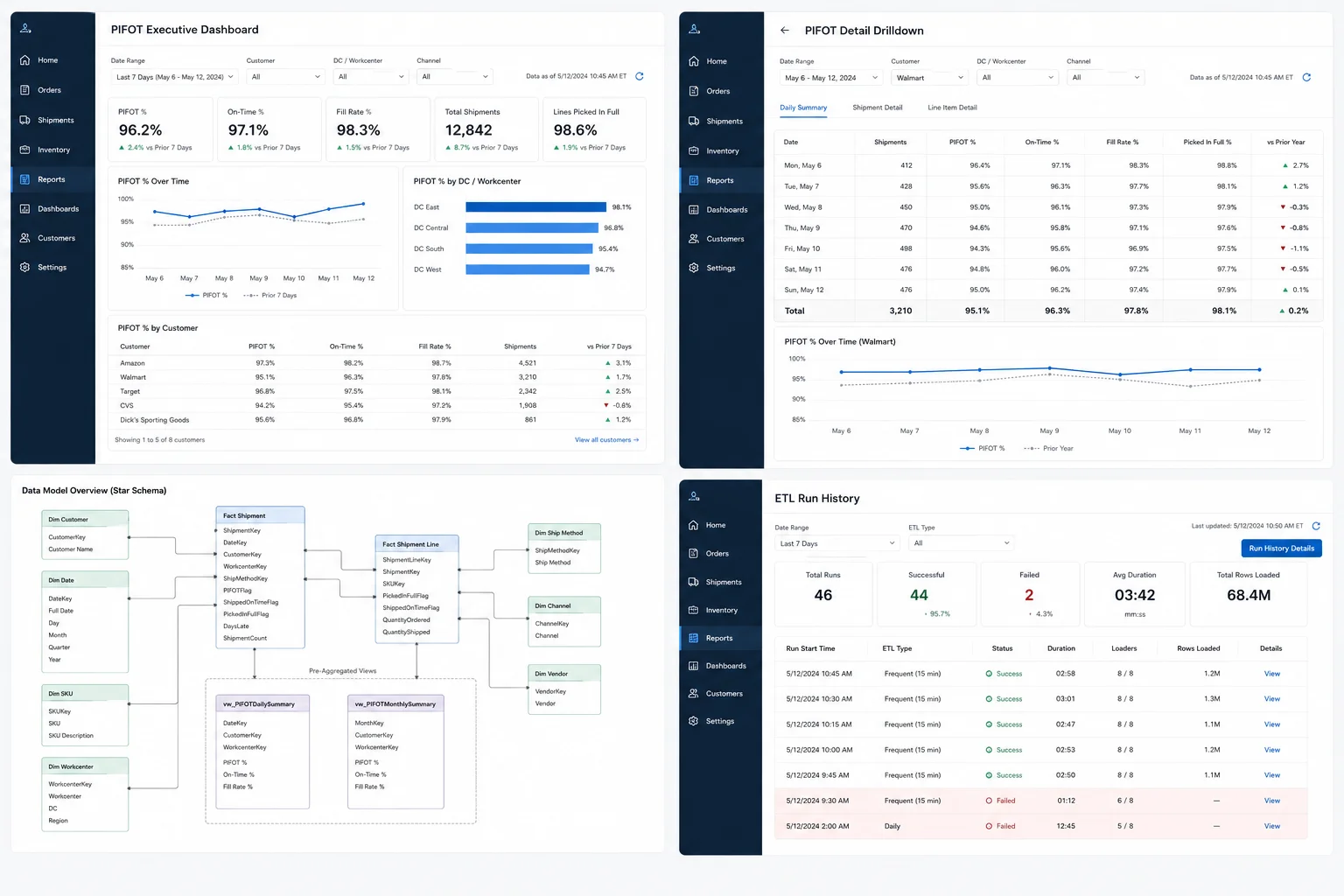
Embedded Power BI dashboard showing PIFOT, on-time, and fill-rate scorecards with drill-down by retailer, workcenter, and channel
  • An ETL pipeline pulls fresh data from the legacy ERP and the operational database every fifteen minutes during business hours, with a deeper refresh overnight.
  • A star-schema warehouse pre-computes SLA flags (PIFOT, on-time, fill rate, days late) at both the shipment and line-item level.
  • A Power BI report is embedded inside the operations app, drillable by customer, workcenter, and channel.
Results
~15 min PIFOT refresh, down from weekly
~1 analyst-day/wk freed from rebuild work
~7 days of reporting lag eliminated
  • Hours of analyst time recovered each week. The weekly spreadsheet exercise turns into a refresh-and-glance.
  • A shift from reactive to proactive ops: catching shipments at risk at 11am instead of explaining the miss after the fact.

Every retailer produces a number. Yours rarely matches.

Every retailer who matters (Amazon, Walmart, Target, CVS, Dick's, and the rest) measures you the same way. PIFOT, on-time delivery, fill rate, broken down by DC, by week, by channel. They'll produce their own version of the number, send it to you, and dispute yours if it doesn't line up.

For most 3PLs, answering that is a weekly fire drill. An analyst pulls extracts from the WMS, reconciles them by hand against the TMS or ERP, drops the result in a spreadsheet, emails it around. The number is days stale by the time anyone reads it, rarely matches the retailer's exactly, and the week's already over. There's no fixing the misses, just explaining them. The underlying issue: orders and customers live in the legacy ERP; shipment status, ship windows, and validation events live in the modern operational database. Reconciling them by hand is what makes the report slow.

A dedicated analytics layer that turns two data sources into one number.

Every fifteen minutes during business hours, an ETL pipeline reads from both the legacy ERP and the operational database, lands what it finds in a star schema, and pre-computes the SLA flags retailers actually care about. A Power BI report sits on top, embedded right inside the operations app. The dashboard that runs the Monday review is also the one that's one click away during the day.

Four pieces that turned the weekly fire drill into a live dashboard.

Step 01

Unify the legacy ERP and the operational data into one model

Orders, customers, and historical financial data live in the legacy ERP. Shipment status, ship windows, validation outcomes, and customer-specific rules live in the modern operational system. Neither side alone can answer "did we hit PIFOT this week." An ETL service reads from both, lands the data in a clean star schema (eleven dimension tables, seven fact tables), and exposes pre-aggregated views for the queries that run most often.
Step 02

Pre-compute the SLA flags that matter, at the right grain

PIFOT, fill rate, on-time, days late. Every one of those has a precise definition, and every one can be argued about if it's computed differently in different places. A shipment-fact loader computes the flags at the shipment level; a line-item loader does the same at the line level. Whether you're looking at a corporate KPI tile or the retailer-facing scorecard, the same definition produces the same number.

Step 03

Refresh fast enough to be operational, not just retrospective

A weekly report tells you what already happened. A live dashboard tells you which shipments are at risk right now. A scheduled worker runs a frequent ETL every fifteen minutes during business hours, and a deeper daily ETL overnight. Run locks keep them from overlapping, and every run is logged. Operations can stop explaining the miss after the fact and start catching it while it's still preventable.

Step 04

Embed the dashboard where the operations team already lives

Reporting tools that live outside the operations app get ignored. People log into the app every day; they don't log into the BI tool every day. A Power BI report is embedded inside the operations app's Analytics page, authenticated through an Azure AD service principal so there's no token plumbing for the end user. PIFOT, on-time, and fill rate live at the same URL as the shipment list.

Technical detail (for the engineers in the room)
  • .NET 8 · ETL orchestrator sequences dimension-then-fact loader runs, with run locks so two refreshes can't trip over each other
  • Scheduled worker runs a frequent ETL every fifteen minutes during business hours (Eastern) and a deeper daily ETL overnight
  • SQL Server · star schema holds the analytics warehouse, with the shipment-fact loader computing PIFOT, on-time, fill-rate, and lead-time flags at the shipment grain
  • Pre-aggregated SQL views materialize the daily and monthly rollups Power BI hits the most
  • Power BI · DAX defines the canonical KPI measures so every tile and scorecard is computing the same number the same way
  • React · MUI · Azure AD embed the Power BI report inside the operations app's Analytics page through a service-principal embed flow

Want this kind of visibility in your operation?

Book a free intro call. Tell us where your PIFOT number lives today, and we'll show you what it would take to make it live.

Book an intro call
(407) 349-3633